
Witen Blocker vs WP fail2ban
Witen Blocker runs protection inside WordPress, including on shared hosting. WP fail2ban connects WordPress events to a Fail2Ban installation managed by you or your host.
Published by Witen Labs. Reviewed . Witen Blocker 0.6.47; WP fail2ban's free plugin, with Premium and Blocklist differences noted.
Choose Witen when…
You want to manage IP rules, login limits, bot policies, and file checks from WordPress. You can start without root access and add Warden later if you also control the Linux host.
Choose WP fail2ban when…
Your host already runs Fail2Ban, or you manage its jails yourself and want WordPress events to feed that setup. Its documented hard and soft filters give you separate responses to different events.
How they compare
Scroll the table sideways to see both products.
| What matters | Witen | WP fail2ban |
|---|---|---|
| Hosting access | WordPress administrator access. No root access needed for local plugin protection. | Banning requires a configured Fail2Ban service on the host. Installation requirements. |
| Where blocks happen | The plugin rejects requests inside WordPress. Optional Warden integration adds host-firewall enforcement. | Logs WordPress events for Fail2Ban to enforce through its configured actions. Also includes application controls such as user-enumeration blocking. |
| Day-to-day controls | IP allowlists and blocklists, individual bot policies, login settings, activity history, and file checks in the dashboard. | Free includes a recent-syslog widget. Premium adds event history and additional controls. Feature list. |
| Shared blocklists | Optional Witen enrollment adds shared IP intelligence. Hosted plan limits and reporting requirements apply. | The separate Blocklist add-on shares attack data and receives site-specific lists. It requires WP fail2ban, Freemius opt-in, and jail configuration. |
| Setup | Install Witen Blocker from WordPress.org, review trusted addresses and policies, then optionally connect a Witen account. | Install the plugin, configure WordPress settings and host jails, then verify logs reach Fail2Ban. Setup documentation. |
Working from the WordPress dashboard
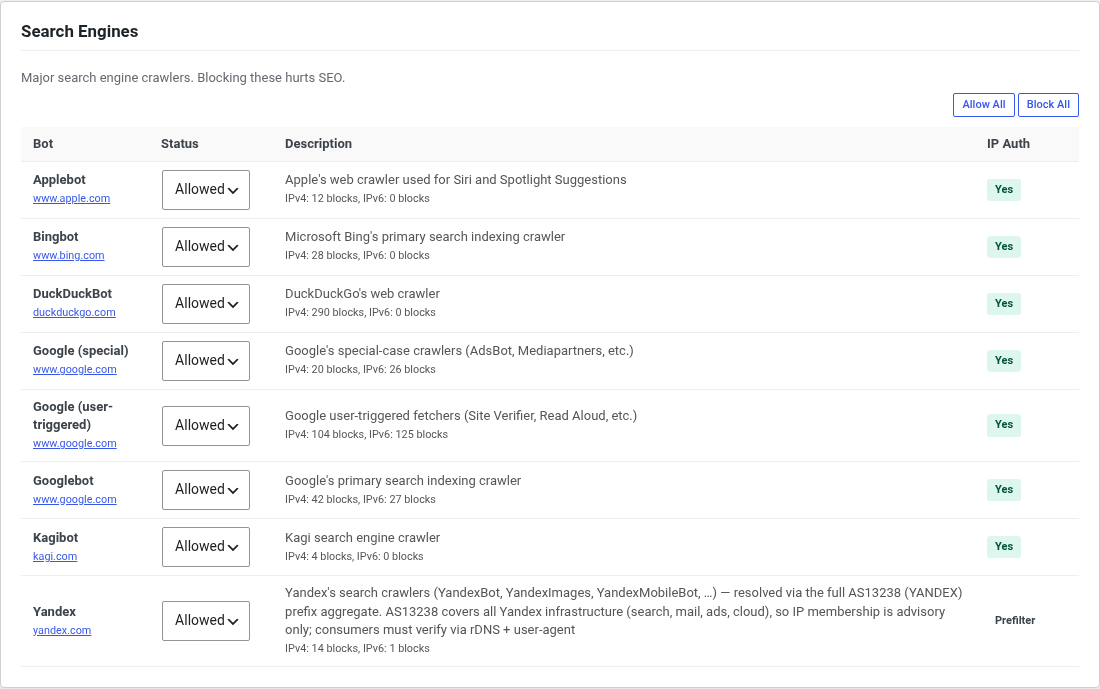
Witen’s local settings let you decide which known bots to allow or block. You can review activity and adjust trusted addresses without changing a server jail.
These rules cover requests that reach the plugin. Host-firewall protection requires a service such as Warden. Neither setup replaces WordPress updates or strong account security.
What costs money with Witen?
The software downloads and local protection are free to use. An optional hosted account adds shared IP intelligence and reports from enrolled systems.
Free includes 1 connected asset, a top-50 shared IP blocklist, and daily updates with a 14-day delay on new threats. Starter is $12/month for 2 assets and current shared data. Compare all plans and annual billing.
What leaves your site?
Witen’s local protection works without enrollment. Connecting shared intelligence enables security-event reporting: IP addresses, request metadata, authentication events, and site details. Attempted usernames may be included. File samples are a separate option. Read the plugin’s data-sharing disclosures before connecting.
WP fail2ban’s local logging and its Blocklist service are separate. The add-on’s service description explains its shared data and Freemius requirement.
If you already use WP fail2ban
Start by checking what your host already enforces. Keep its current protection in place while reviewing Witen’s settings. Assign responsibility for login limits and IP blocks deliberately so overlapping rules remain understandable.
Have administrator access to Linux? The Warden and Fail2Ban comparison covers the host side.